








Picture the back office as the nervous system of your organization. This sophisticated network coordinates all processes within a company’s organism making it function properly.
While front-office operations usually steal the show, with their direct customer interactions, strong handshakes, and big smiles, back-office operations occur behind the scenes. Yet both are two sides of the same coin. Front-office teams build customer relationships and win business, while back-office teams help ensure that orders, payments, records, and other essential processes run smoothly. Neglecting either side can affect the entire customer experience.
The benefits of getting these processes right are substantial. According to EXL, back-office workforce optimization has been associated with roughly a 25% reduction in end-to-end processing time and a 30% improvement in adherence to service-level agreements (SLAs) and turnaround times. Meanwhile, KPMG’s 2025 Future of Front Office report found that 45% of respondents identified improved efficiency, streamlined processes, and reduced duplication as the most important benefit of a connected front-office strategy. Together, these findings highlight the value of efficient operations and better coordination across business functions.
So, what does effective back-office support look like, and when does outsourcing make sense? Read on to discover what back-office operations involve and why companies may choose to outsource these routine yet essential activities.
Key takeaways
- Back-office operations keep a business running. Functions such as HR, accounting, IT, procurement, compliance, order processing, and document management support everyday operations and customer-facing teams.
- The front office, middle office, and back office serve different purposes. The front office manages customer relationships and generates revenue, the middle office oversees risk and compliance, and the back office handles essential internal processes.
- Back-office responsibilities vary by industry. Banking, insurance, healthcare, retail, hospitality, software, and logistics each have distinct workflows, regulatory requirements, and operational challenges.
- Modern back offices rely on automation and connected systems. RPA, intelligent document processing, AI assistants, ERP platforms, and cloud tools reduce repetitive work, improve information flow, and help employees focus on exceptions and decisions requiring human judgment.
- Outsourcing can reduce operational costs and increase flexibility. It provides access to specialized talent, technology, and additional capacity while allowing internal teams to focus on core business activities.
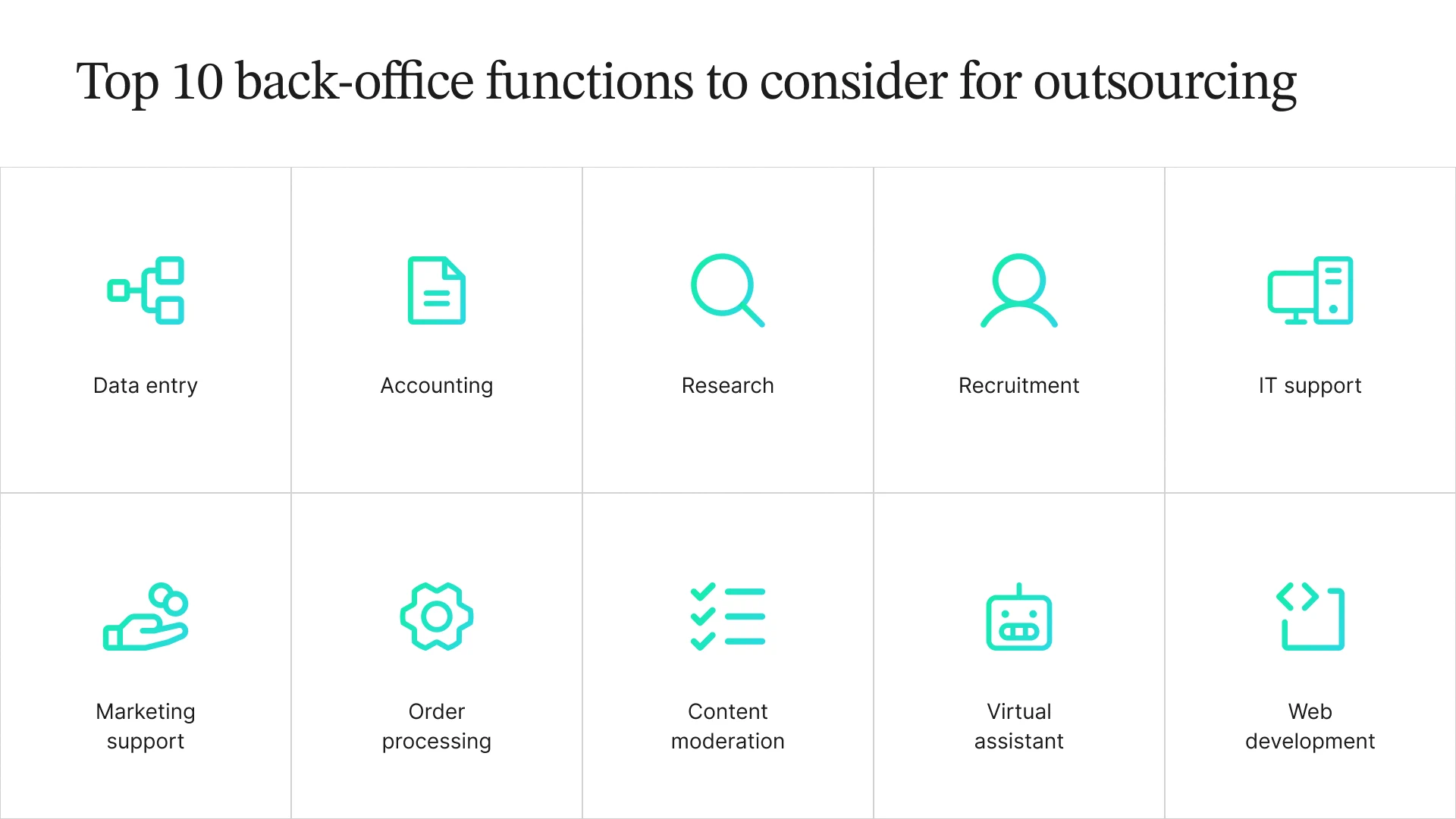
- Many back-office functions can be outsourced. Common examples include data entry, accounting, research, marketing support, recruitment, order processing, content moderation, IT support, web development, and virtual assistance.
- Performance measurement helps identify opportunities for improvement. Metrics such as turnaround time, error rate, first-time-right rate, cost per transaction, backlog, SLA attainment, and automation rate help assess operational efficiency and quality.
- Effective back-office management combines the right delivery model with clear controls.** Standardized workflows, targeted automation, documented procedures, security safeguards, measurable service targets, and carefully selected outsourcing partners support sustainable growth.
What Are Back-Office Operations?
Let’s start with a definition. In simple terms, the back office refers to the part of a company responsible for administrative and support tasks, such as accounting, IT services, HR, etc., which do not directly interact with customers. Back-office operations form the solid foundation that successful companies rely on to succeed. While not directly revenue-generating, these unnoticeable processes are extremely important for backing profit-driving activities. If you are involved in any form of business development, then you already know how crucial these processes can be for your company’s daily work.
The scope and complexity of back-office functions vary by company size and industry, but several key ones are universal:
Human Resources
This domain takes care of the most important part of any organization—its people. It covers everything from hiring the right talent to providing training and managing the talent effectively.
IT Support
These days, everything is digital, so it’s crucial to keep both software and hardware in good shape—and that’s exactly what IT support is all about.
Legal Support
These professionals are the shield that protects the company from any law-related issue. Lawyers are usually experts in their own industry, as the specifics of the cases vary from one sector to another.
Compliance, Fraud, and Risk Management
There are certain rules and regulations that exist in any domain. The main task of these back-office operations is to approach them proactively.
Business Procurement
It is the process of supplying a company with all goods and services so that it can work without interruptions or backlogs. Your body needs food to live, right? The same goes for your business.
Finance and Accounting
Experts in this field manage all the financial reporting, budgeting, and accounting practices to keep your business in the black.
Order Processing
In-house managers efficiently coordinate the part of the customer journey from the point when a person clicks “place an order” on a website to ringing the doorbell by a delivery company.
Transaction Processing
This back-office process involves managing the flow of all financial transactions, including internal and external payments.
Document Preparation
Filing experts generate and manage critical documentation to support customer-facing processes.
Inventory Management
The process of tracking and controlling a company’s stock to ensure there’s enough to meet customer demand without overstocking.
Of course, the list is not limited to the back-office operations mentioned above. There are other, more specific types of back office that also need to be managed and operated correctly. However, remember that no business is the same, meaning there is no templated back-office solution.
Difference Between Back Office and Front Office
The beating heart and the public face of your enterprise—back-office and front-office operations—are the twin engines driving your company’s success and profitability.
Most companies divide their operations into two main areas: the front office and the back office. The front office deals directly with customers, bringing in sales, building relationships, and keeping customers happy. The back office handles the behind-the-scenes work that keeps everything running, from processing payments to managing payroll.
Some companies, particularly banks, insurance providers, and investment firms, also have a middle office. Think of it as the link between the two. It helps manage risk, monitor performance, and ensure the business follows the rules. In other organizations, these responsibilities are usually handled by existing finance, risk, or compliance teams rather than a separate department.
Here’s a quick comparison of how the three areas differ:
| Aspect | Front Office | Middle Office | Back Office |
|---|---|---|---|
| Main job | Win, serve, and retain customers | Manage risk, compliance, and performance | Process, record, and settle transactions |
| Customer contact | Direct and frequent | Occasional or indirect | Usually limited or indirect |
| Revenue role | Generates revenue | Protects revenue and helps manage financial risk | Supports revenue-generating teams |
| Typical teams | Sales, marketing, customer service, account management | Risk management, compliance, financial planning and analysis, treasury | Accounting, HR and payroll, IT, procurement, data and document processing |
| Example KPIs | Conversion rate, customer satisfaction, retention | Risk exceptions, audit findings, forecast accuracy | Turnaround time, error rate, cost per transaction |
| Example (banking) | Relationship managers open accounts and serve clients | Risk teams set limits and monitor exposure | Operations teams settle payments and reconcile accounts |
Keep in mind that these categories aren’t set in stone. The exact responsibilities depend on the company and its industry. Some teams may perform a mix of front-, middle-, and back-office functions, but the basic distinction remains the same: the front office serves customers, the middle office manages risk and control, and the back office keeps business processes moving behind the scenes.
The Essence of Front-Office Operations
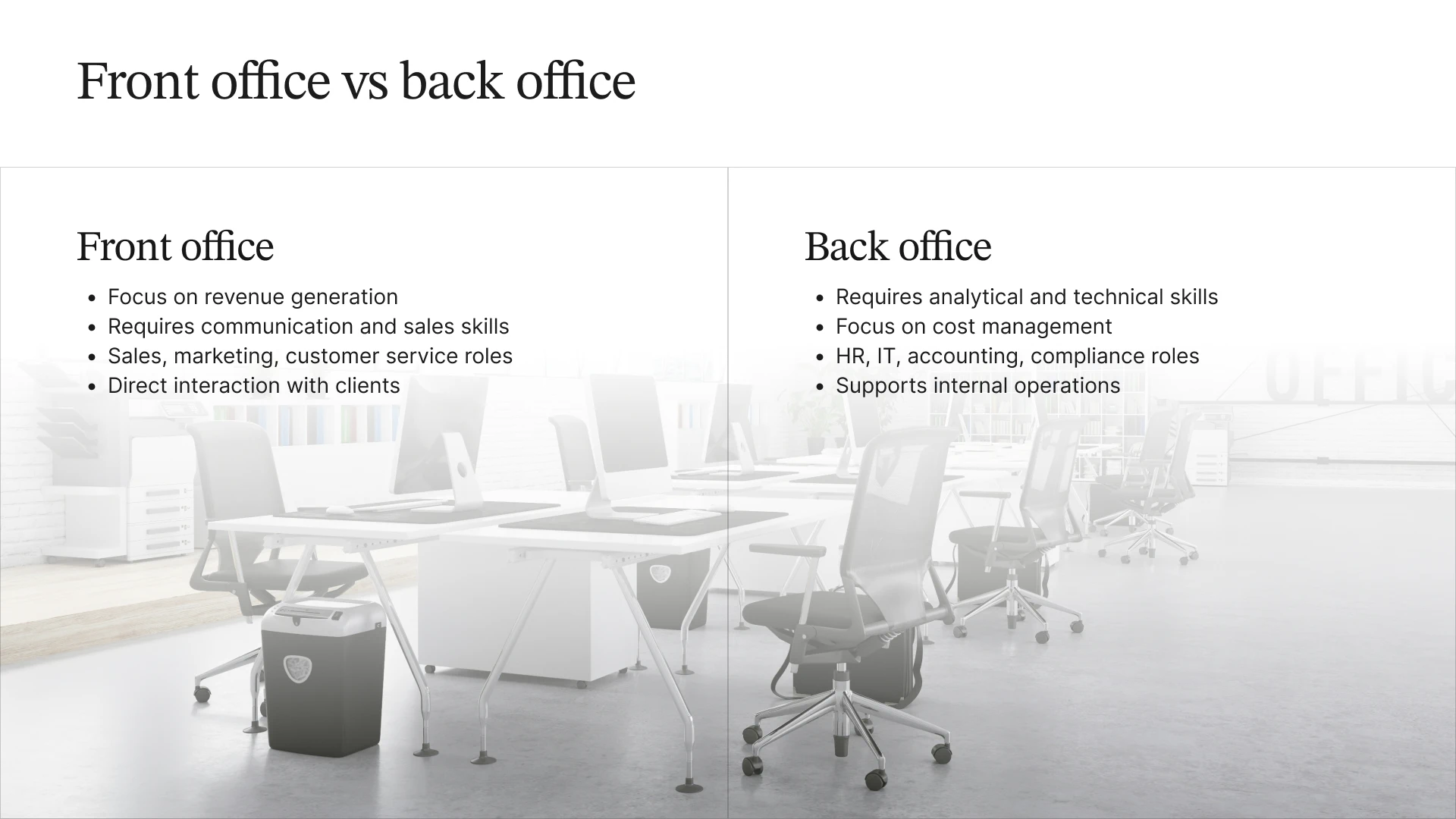
In a business setting, the front office is the face of the company, handling direct interactions with clients and focusing on revenue generation. Think of it as the company’s public persona, where sales, marketing, and customer service roles come into play. Employees in the front office need sharp communication and sales skills to build relationships with customers, generate leads, and keep clients satisfied. Their main job is to bring money through the door, and they are often the ones in the spotlight when a business grows or secures new deals.
Standard front-office functions include:
Sales Support. Sales representatives are responsible for promoting, advertising, and selling products or services to the final customer.
Public Relations & Brand Enforcement. These branding professionals manage the organization’s public image to protect and enforce the organization’s identity and intellectual property.
Customer & Technical Support. Agents that conduct daily interactions with customers to build relationships and promote loyalty by providing support, assistance, and query resolution.
The Essence of Back-Office Operations
On the other hand, the back office works behind the scenes, quietly keeping the company’s internal operations running like a well-oiled machine. Roles in departments like Accounting, HR, IT, and Compliance don’t have direct customer contact, but they are crucial for managing costs and ensuring the business runs smoothly. It’s the back office that keeps things on track, ensuring employees are paid, systems function, and regulations are met. This side of the business requires more analytical and technical skills, focusing on efficiency rather than flashy results. While they may not get the kudos, without the back office, the front office wouldn’t be able to do its job.
Standard back-office functions include:
Data Analysis Support Services. This function provides analytical insights, data processing, and reporting to support informed decision-making across the organization.
Technical Support Services. These teams keep the company’s internal technology running smoothly by troubleshooting employee issues, maintaining systems and applications, and supporting the infrastructure the rest of the business relies on. Unlike customer-facing technical support mentioned earlier, this work happens behind the scenes, making it a back-office function.
Administrative Support Services. They involve handling all administrative tasks, such as record-keeping, document management, and general office support, to facilitate operational efficiency.
Back-office operations by industry
The core functions of a back office are much the same across industries, but the work itself can look quite different. Each sector has its own processes to manage and rules to follow. Here’s a look at what back-office operations involve in seven common industries.
| Industry | Typical Back-Office Processes | Common Challenges |
|---|---|---|
| Banking and Financial Services | KYC and AML checks, payment processing, account reconciliation, loan and mortgage processing | Regulatory deadlines, fraud risks, month-end workload spikes |
| Insurance | Policy administration, claims intake and processing, underwriting support, premium accounting | Claims backlogs after major weather events, document-heavy workloads |
| Healthcare | Insurance verification, prior authorization, medical coding, claims and denial management, patient records | HIPAA compliance, changing payer requirements, claim denials |
| Ecommerce and Retail | Order processing, returns and refunds, catalog and inventory updates, supplier invoices, chargebacks | Seasonal demand spikes, large product catalogs, payment disputes |
| Hotels and Hospitality | Night audits, reservation reconciliation, accounts payable, shift-based payroll, revenue reporting | High volumes of small transactions across properties, high staff turnover |
| SaaS and Software | Subscription billing, revenue recognition, user provisioning, license audits, data cleanup | Rapid customer growth, usage-based billing complexity |
| Logistics and Transportation | Shipping documents, freight bill audits, carrier invoicing, customs paperwork | Exception handling, document accuracy |
Industry rules also determine which tasks you can hand off and what safeguards you need in place. For example, if you outsource insurance verification or claims processing in healthcare, your provider must be able to meet applicable HIPAA requirements.
Financial services have their own compliance and audit requirements. Companies outsourcing account reconciliation or loan processing need banking process outsourcing partners who can work within those controls. Online retailers, meanwhile, may look for ecommerce BPO services that can handle the extra workload when peak season rolls around.
Traditional Back Office vs Modern Back Office
At first glance, traditional and modern back office operations may seem almost identical. But dive a little deeper, and you’ll uncover a world of differences between the two concepts. The traditional back office is increasingly becoming a thing of the past, as manual processes, paper-based systems, and siloed functions are being replaced by digital transformation.
Traditional Back Office Operations
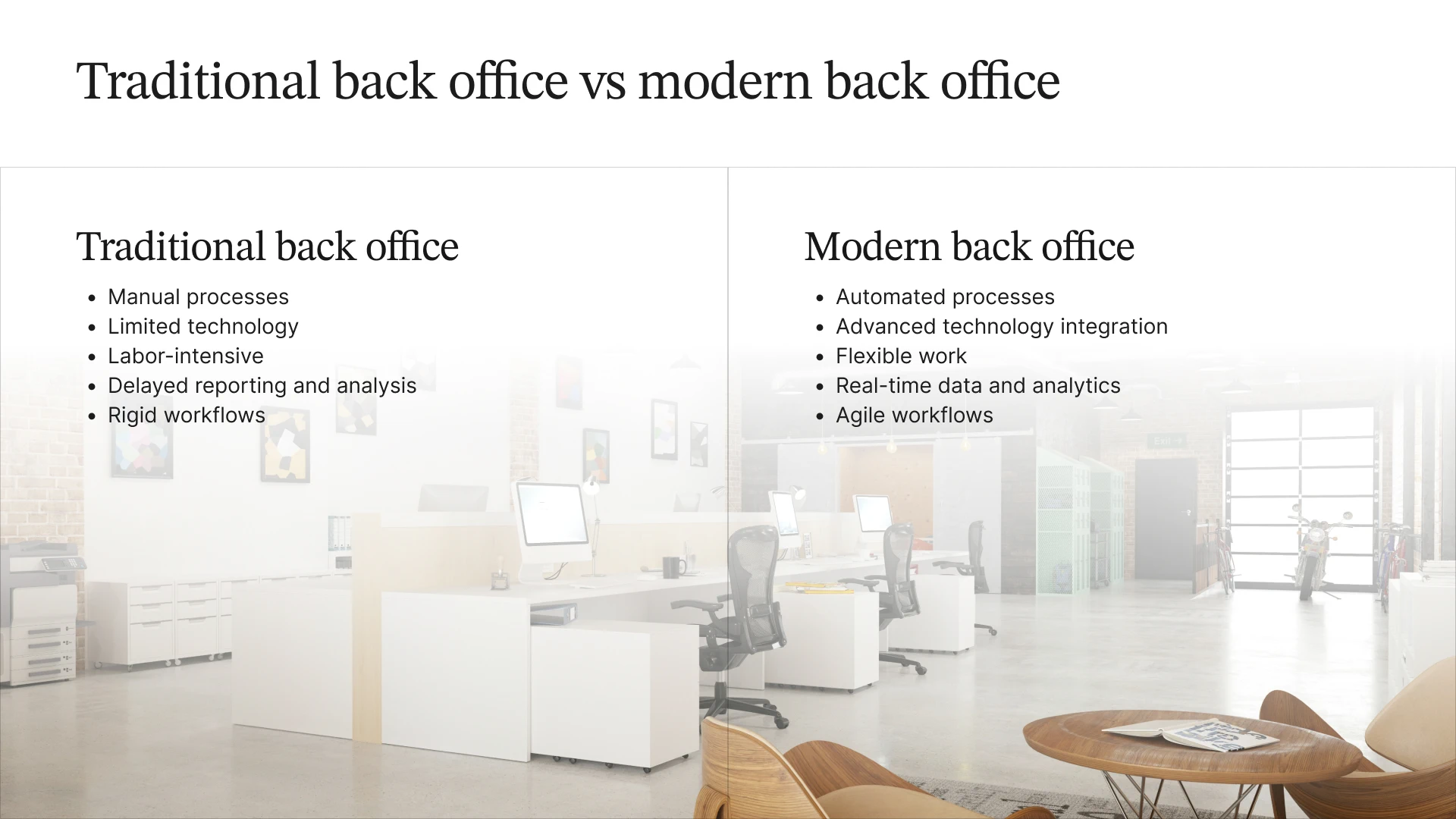
Hardly can you find modern companies operating like this today, but it’s still useful to know what a traditional back office is. In an old-school back office, everything runs on manual processes. Employees spend hours inputting data by hand and managing physical filing cabinets for record-keeping, as paperwork dominates daily tasks. This reliance on paper slows things down, with data entry and documentation done manually, leaving room for frequent errors.
Technology is limited, with outdated software that doesn’t integrate with other systems, leaving data in isolated silos. As a result, different departments struggle to collaborate efficiently. The lack of advanced tools means companies are heavily dependent on human labor. Routine tasks like data entry and invoice processing are labor-intensive and require manual coordination across teams.
Reporting is slow and often relies on outdated information, making it difficult for decision-makers to have real-time data for strategy planning. Workflows are rigid, with little flexibility, making it hard for companies to adapt to new business needs. When markets shift quickly, these outdated systems can’t keep pace, leading to delays and inefficiencies that put businesses at a disadvantage.
Worth reading: Top 10 invoice processing outsourcing companies in 2027.
Modern Back Office Operations
Fast forward to today, and the modern back office is a different world. Automation has streamlined many processes, and digital tools handle repetitive tasks, freeing employees to focus on more strategic work. AI and machine learning support tasks such as data annotation, while cloud-based systems store information electronically and make it accessible from anywhere. According to McKinsey’s research on AI, nearly nine in ten respondents report regular AI use in at least one business function.
Other technologies help connect the dots across departments. Enterprise Resource Planning (ERP) systems and EDI integration tools help information move between systems, reducing the need for manual data entry and breaking down those old silos. Meanwhile, tools like Slack and Microsoft Teams keep distributed teams connected, whether they work in the same office or across several time zones. Real-time reporting gives businesses a clearer picture of what’s happening, while predictive analytics can help them anticipate future trends and customer needs. With more flexible workflows, companies can also adapt more quickly when the market changes.
Three technologies are doing much of the heavy lifting in today’s back offices:
- Robotic process automation (RPA): Software bots handle repetitive, rule-based tasks, such as transferring data between systems, triggering approvals, and matching invoices as part of accounts payable automation.
- Intelligent document processing (IDP): AI extracts information from invoices, claims forms, and contracts, then flags uncertain results for a person to review.
- AI assistants and agents: These tools can draft responses, summarize cases, and route exceptions to the right team. People still review decisions that require judgment or carry significant risk.
Put these tools together, and you get a hybrid team. Automation handles routine tasks at scale, while trained employees take care of exceptions, judgment calls, and quality checks. This human-in-the-loop AI approach helps businesses improve accuracy while keeping people involved where their expertise matters most.
The shift from manual processes to automation doesn’t mean people are no longer needed. It means they can spend less time on repetitive work and more time on tasks that require human judgment. Combined with more flexible systems, this helps businesses build back-office operations that are more efficient, resilient, and ready to scale.
Advantages of Outsourcing Back-Office Operations
Outsourcing back-office processes has become a strategic approach for businesses seeking to make their operational processes more efficient, less costly, and more flexible. Of course, company leaders want their departments to focus on their core competencies and strategic development rather than being bogged down in piles of paperwork. That’s why more and more companies are trusting routine back-office operations to outsourcing providers. Statista projects that the worldwide BPO market will reach $519.75 billion by 2031, growing at a compound annual growth rate (CAGR) of 4.11%.
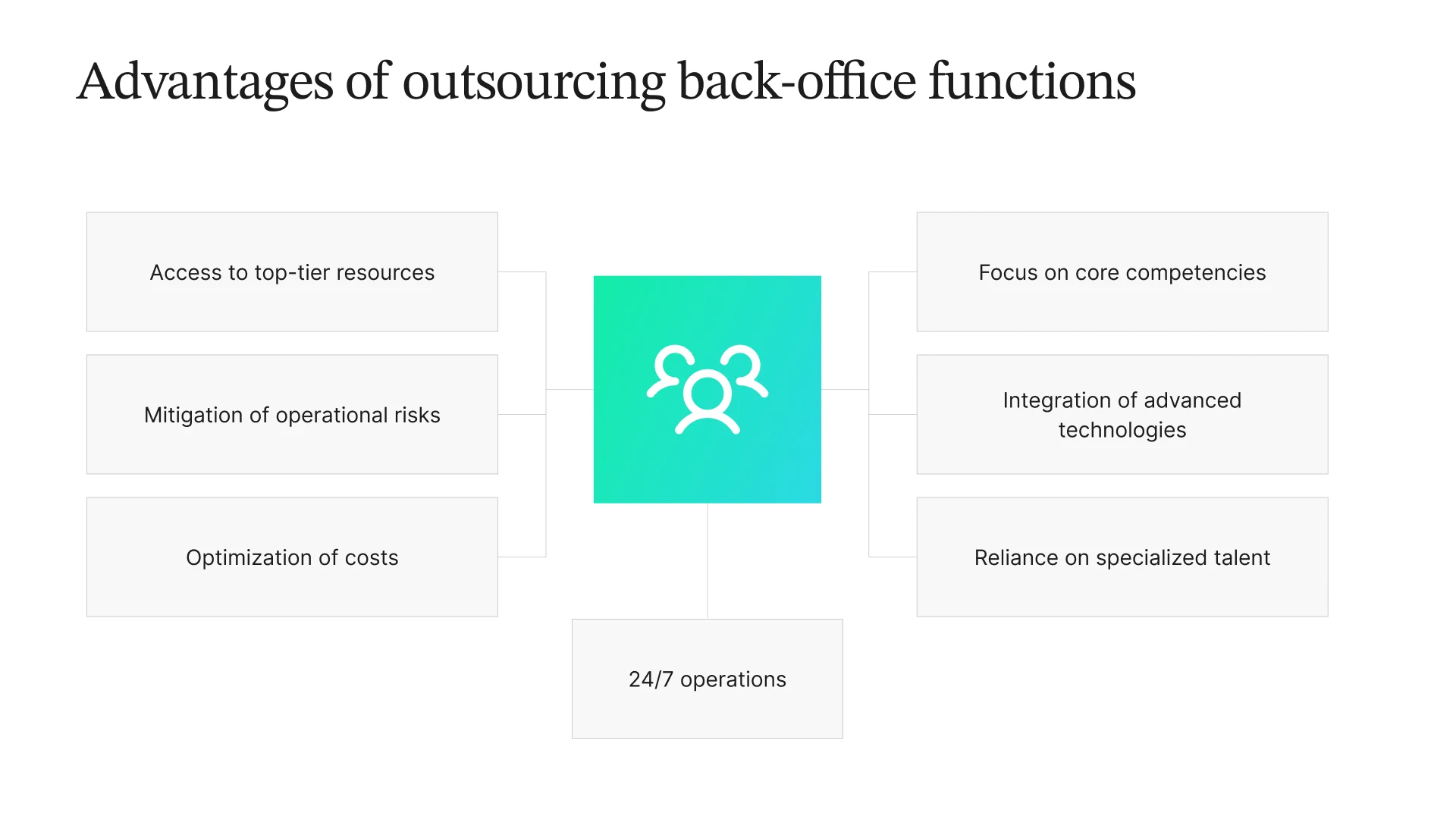 There are several main advantages of outsourcing back-office functions that look pretty convincing:
Mitigation of operational risks
If you are involved in many different activities, especially monotonous ones and demanding constant concentration, making mistakes is a common occurrence. Multitasking can only give good results when you have the ability to clone yourself and your clones are better at it than you are.
Access to top-tier resources
Outsourcing allows businesses to tap into a readily available pool of resources and expertise without the need for extensive recruitment, training, and infrastructure investments. Back-office service providers have the necessary technology, facilities, and skilled workforce to handle various back-office processes effectively.
Optimization of costs
If you outsource back-office processes, you can redirect saved resources to your strategic needs. By mentioning savings, we aren’t saying that back office services are cheap. They aren’t. However, if you pay to your trusted outsourcing partner, in return you get high quality for less money. That’s the point.
Reliance on specialized talent
Outsourcing provides access to a diverse pool of highly skilled professionals who specialize in specific back-office functions. BPO providers have dedicated teams with deep expertise in different domains and use industry best practices.
Focus on core competencies
Outsourcing back-office functions allows businesses to concentrate their internal resources on their core competencies and strategic goals. By delegating non-core tasks to outsourcing partners, companies can allocate their human capital, time, and energy to areas that directly contribute to their growth and competitive differentiation.
24/7 operations
Outsourcing never stops, with major global BPO companies having locations across different time zones. You’ll benefit from this 24/7 support, as it will bring tangible results to your business operations.
Integration of advanced technologies
Businesses can get help in managing complex tasks that require specialized knowledge, resources, or advanced technologies.
10 Back-Office Functions You Can Outsource Today
As a business, your main goal is to grow. Growth is best achieved by optimizing the way your company works, and a reliable outsourcing strategy can help you effectively scale your business. Every company has its own stance on outsourcing. It is wise, however, for businesses to build outsourcing into their overall business strategy, as this allows your team to fully focus on the company’s growth. With a little outsourcing in the back office, you can redirect valuable time and resources typically spent on back-office processes. These ten back-office tasks are easy to outsource! Save your team the effort of fitting these rote tasks into their busy schedule.
1. Data Entry
Outsourcing data entry can save your company a lot of time and money, and with the resources you save, you can instead focus on perfecting front-office processes! Some examples of data entry tasks include:
- Entering data from surveys
- Inputting data in invoices
- Processing forms
- Transcribing
- Inputting data into Excel sheets
Although some of the back-office processes are already done with the help of AI, people are still in great demand to verify if everything is done properly. By outsourcing your data entry jobs, you can also expect greater accuracy. Data entry professionals are incredibly detailed—likely more so than an overworked team member who doesn’t specialize in the entry but has to sift through tons of data.
2. Accounting
Accounting is a crucial part of every business. Good accounting keeps track of a business’s money flow and provides you with the crucial financial information needed to make business decisions. As such, outsourcing your accounting processes to professionals might make more sense if you want accurate numbers! Outsourcing accounting work can result in heightened accuracy, cost-effective service, timely payroll processing, fraud control, and up-to-date accounts and cash flow records, making routine tasks—such as making a pay stub—easier and more efficient. It is important to ensure that your accounting efforts are properly managed. Outsourcing helps you take a step back and see the bigger picture in terms of your finances, so you can make business decisions with a more level head.
3. Research
Businesses require intensive research to achieve long-term success. Research is the foundation of a business’s data collection and provides specialists with valuable market insights. For example, you can find out who your buyer persona should be by researching the type of person who would purchase your product or service.
In today’s digital age, web research has become particularly prevalent. Data-driven marketing and decision-making are more likely to help a company grow and boost profitability, so investing in research is a wise business practice. Some benefits of outsourcing back-office processes include:
- Access to the latest tools and technologies for research
- Timely delivery of findings, which makes for more accurate data
- Valid and verifiable information
- In-depth analysis and reporting of collected information
Outsource this research work and you’ll always keep your finger on the market’s pulse and track your competitors without having to use your in-house team. In this way, your company can quickly react to any changes and keep up with how the market moves.
4. Marketing Support
Marketing is responsible for a company’s relationship with its customers. Customer loyalty is built on trust, and in the digital space, trust is built through a solid marketing strategy. The most successful businesses are those that have a good grasp on their target audience’s wants and needs, thereby being able to provide a solid customer experience.
Unfortunately, not all teams are well-versed in the fast-paced world of marketing. If your team suffers from this, it may make sense to outsource your marketing processes and work with an external agency. Outsourcing this key back-office function gives you a partner with expertise in marketing and access to the latest marketing techniques and technologies.
Trusting the work to professionals guarantees effective marketing campaigns and content that resonates with your business’s target audience. Outsourcing your marketing also assures a solid return on investment through effective lead generation and accurate metrics reports. This data-driven advice will optimize your marketing strategy.
5. Recruitment
Your team is the heart of your company. Who you hire can significantly impact whether your business succeeds or fails, which is why recruitment is an important process for every business. However, recruitment also requires a lot of time and effort on the part of the recruiter. Back-office outsourcing can help take the load off your team.
You may opt to outsource some or all parts of your company’s recruitment process to ensure that you only get the best candidates. Your in-house Human Resources team may not have the time or know-how to handle the recruitment process, so have an independent team facilitate it for you instead. Outsourced recruiters will:
- Create a recruitment strategy for your company
- Manage your recruitment process
- Weed out any unfit candidates
- Conduct assessments and interviews
- Onboard new hires and show them the ropes
With today’s advanced technology, recruitment can even be supercharged with AI, automation, scheduling bots, and advanced CRM platforms. This helps recruiters fast-track the recruitment process for maximum efficiency
6. Order Processing
Order fulfillment is perhaps one of the most tedious processes for companies that offer a product. Getting new customers is important, but it is even more important to process and fulfill existing customers’ orders to provide a quality customer experience. Because this process is both intricate and fast-paced, in-house teams tend to struggle to keep up with the demands of order fulfillment. That is why you should consider back-office outsourcing for your company’s order processing.
Outsourcing order processing offers tried and tested order management strategies. Orders will be fulfilled on time, every time, and refunds and return requests won’t be your hassle any longer. With less time spent on tracking and processing orders, you’re free to turn your attention to more pressing matters.
7. Content Moderation
Producing and curating content on the Internet are some of the best ways to connect and communicate with your audiences. In the digital space, user-generated content has become a way for many businesses to market their brand. However, some content may be dangerous or potentially detrimental to your business. To uphold your audience’s trust in your brand, a content moderation team needs to keep tabs on user-generated content.
Because of its constant nature, content moderation requires a lot of time and dedication. Outsourcing this back-office process would be wise so that you can delegate other tasks to your in-house team. Other advantages of outsourcing content moderation include:
- Curated content that accurately reflects your unique brand story and values
- Enhanced sensitivity to cultural and social differences to cater to all audiences
- Swift removal of any unwanted content
- Protection from malicious or dangerous pieces of content
- Support for your brand’s PR efforts.
8. IT Support
IT support helps businesses manage their technologies, ensuring smooth and efficient operation. This also helps your customers have a smoother user experience. However, IT support requires a certain level of expertise. Some in-house teams may not have the capabilities to properly execute these processes, so outsourcing is highly recommended. For example, new customers may need help with different setup tasks. Outsourcing IT support reduces labor costs while also ensuring you have IT experts on the case. This, in turn, lessens the risk of something going wrong, and assures increased security and regulation compliance—all at a fixed, manageable cost!
9. Web Development
Your company’s website acts as your digital greeting card. That is why many companies opt to hire professional web developers to create a stunning, streamlined website. By hiring web development professionals, you are assured of a quality website that can further your overall business goals. Sure, your team may have some experience in developing a website, but outsourcing seasoned professionals means that you can deploy tech-savvy elements to manage and integrate any desired feature, no matter the difficulty.
10. Virtual Assistant
Virtual assistants provide managers and team members with the same level of support that in-person assistants do. However, they also manage and facilitate various tasks through the virtual space. This is made possible through messaging and file-sharing platforms that allow them to communicate with the rest of the team in real time. A virtual assistant works more efficiently than a traditional one. It also does not require a physical office and can be communicated with from afar, allowing a company to save on overhead costs. Tasks like organizing files, responding to emails, appointment setting, collateral creation, returning a phone call, and taking notes can all be assigned to a virtual assistant. Organize your managerial functions and simplify your work life while saving on labor costs!
Worth exploring: 10 best ecommerce virtual assistant services in 2027.
How to Measure, Improve, and Scale Back-Office Operations
You can’t improve what you don’t measure. Start with a handful of KPIs that show how quickly, accurately, and reliably each process runs, along with what it costs. These numbers help you spot bottlenecks, decide what needs fixing first, and figure out which tasks are worth automating or outsourcing.
Back-office KPIs to track
Here are seven useful metrics to keep an eye on when measuring back-office performance.
| KPI | What It Measures | How to Use It |
|---|---|---|
| Turnaround time | Time from receiving a request to completing the task | Identify bottlenecks and set SLA targets |
| Error rate | Share of items that need correction or rework | Spot training gaps and identify tasks that could benefit from automation |
| First-time-right rate | Share of items completed correctly without rework | Track quality improvements over time |
| Cost per transaction | Total process cost divided by the number of items processed | Compare the costs of in-house, automated, and outsourced options |
| Backlog | Number of items waiting beyond their target completion time | Plan staffing levels and prepare for workload peaks |
| SLA attainment | Share of work completed within agreed service targets | Hold internal teams and external providers to the same standards |
| Automation rate | Share of tasks completed without manual intervention | Measure the impact of automation projects |
Review these metrics regularly. Weekly reviews work well for high-volume processes, while monthly reviews may be enough for less frequent tasks. Pay particular attention when SLA attainment starts to drop. It can be an early warning that a process is struggling to keep up, giving you time to address the problem before the backlog grows.
How to scale back-office operations in 6 steps
Growing your business shouldn’t mean growing every back-office headache along with it. Before adding more people or investing in new tools, take a closer look at how your processes work today. A few practical steps can help you build operations that are easier to manage as volume increases.
- Document each process. Map out the inputs, steps, owners, systems, and exceptions involved. You can’t improve a process consistently if everyone handles it differently or relies on undocumented knowledge.
- Standardize the workflow. Make sure teams follow the same steps across people and locations, and establish clear rules for handling exceptions.
- Automate repetitive tasks. Start with high-volume, rule-based work such as data capture, invoice matching, and status updates.
- Put people where they’re needed most. Use trained employees for tasks that require judgment, and build quality checks into the workflow rather than waiting until the end to catch mistakes.
- Set targets before scaling up. Establish KPIs and SLAs before the workload grows, so you can spot problems early and see whether quality is keeping pace with volume.
- Test outsourcing on a small scale. Start with one well-documented process, agree on performance targets with your provider, and expand once the results meet your expectations.
How to decide which back-office processes to keep in-house, automate, or outsource
Not every back-office task needs the same solution. Some are too closely tied to your business strategy to hand over, while others are repetitive enough to automate. Still others benefit from the skills and flexibility of an external team.
To decide what makes sense for each process, consider how rule-based it is, how much work it involves, and how closely it relates to your competitive advantage.
| Decision | Best Fit When the Process… | Examples |
|---|---|---|
| Keep in-house | Gives your business a competitive edge, requires deep company knowledge, or involves decisions that should stay with your leadership team | Pricing strategy, credit or underwriting decisions, financial strategy, vendor negotiations |
| Automate | Follows clear rules, handles high volumes, and relies on structured data | Invoice matching, data capture from standard forms, status notifications, scheduled reports |
| Outsource | Requires trained staff and human judgment, involves steady or seasonal workloads, and follows documented procedures | Claims processing, insurance verification, order and returns processing, account reconciliation, content moderation |
| Combine | Includes repetitive tasks at scale but also generates frequent exceptions that need human review | AI-powered document processing paired with a human team that reviews flagged items |
In practice, most companies use a mix of all three approaches. Even an automated process needs someone to monitor its performance, and an outsourced process still needs an internal owner to review results and make sure the work meets your standards. The goal isn’t to automate or outsource everything. It’s to find the right balance so your back office can keep up as your business grows.
How to Outsource Back-Office Operations Effectively?
Partnering with a reputable business process outsourcing company can turn the tables for many businesses. Sure, handling routine tasks in-house is possible, and there’s no doubt your team is capable of doing it, but when it comes to driving real growth, sometimes an extra set of hands is exactly what’s needed. That’s why we highly recommend keeping a few key factors in mind before outsourcing to an external provider.
Evaluate industry expertise
It’s critical that your outsourcing partner have expertise and experience within your specific industry. It allows BPO teams to understand your unique challenges and requirements and deliver services that align with your business’s core needs.
Emphasize information security
In an era where data breaches are a common issue, ensuring strong data security and regulatory compliance is non-negotiable. Your outsourcing partner should prioritize data protection to the highest degree and safeguard your sensitive information at all times.
Assess technological capabilities
The more advanced the technological capabilities and infrastructure of your outsourcing partner, the more efficient your operations will be. If a BPO company relies on cutting-edge tools to ensure accurate and exceptional back-office processes, you can rest assured that it will deliver great results.
Evaluate scalability and flexibility
Another critical factor is the ability of your outsourcing partner to scale and adapt as your business grows. As businesses must be highly adaptable to market changes, so too should your partner—flexible and responsive to your evolving requirements.
Apart from that, you need to ensure you understand what you expect from the outsourcing company. There should be no trade-off at this point. Likewise, giving up quality for the sake of the economy is the gravest mistake you can make. It could only contribute to higher costs later. Bear in mind that back-office operations are the underlay for the front-office functions. However, there are several ways to cut outsourcing costs. Consider the following:
- Specify your requirements. To maximize the benefits of contracting out, it’s essential to identify the specific tasks that require external assistance. This approach helps reduce costs by focusing on areas where outsourcing is most efficient. For instance, if marketing requires more support than data entry, it’s more cost-effective to outsource marketing while allowing in-house staff to handle data entry.
- Don’t sacrifice quality for lower costs. Choosing the cheapest provider isn’t always the best way to save money. Poor-quality work can lead to errors, delays, and extra work for your in-house team. Look for a provider that offers a good balance of cost, accuracy, and reliability. This is especially important when outsourcing tasks related to HR or accounting, where mistakes can affect both employees and the business as a whole.
- Understand how fees are calculated. There is a multitude of aspects that impact what an external service provider will charge for their work. They are volume and speed of work, expertise, level of competence, portfolio and customer feedback, and ease of cooperation. Consider these points when defining if a particular company is trustworthy, or if you need to continue searching.
- Compare pricing models. Outsourcing providers may charge per full-time equivalent (FTE) per month, per transaction, or based on outcomes. Per-FTE pricing works well for steady workloads that require a dedicated team, while per-transaction pricing can suit workloads that fluctuate. Outcome-based pricing ties some or all of the fee to agreed results, such as accuracy or turnaround time.
- Start with a pilot. Before handing over a major operation, test the arrangement with one well-documented process for 30 to 60 days. Measure the results against your KPIs and expand the partnership once the provider consistently meets your targets.
Outsource Your Back-Office Functions with Helpware
Outsourcing your back-office functions can help you save time and money while improving the speed and efficiency of your business processes, especially when certain tasks are too complex or time-consuming to manage in-house.
At Helpware, we combine modern technology with dedicated teams built around your specific processes. We don’t believe in one-size-fits-all solutions; instead, we approach each client’s needs individually, tailoring our strategies to their unique goals, challenges, and business requirements. Our back-office support services cover data entry, claims processing, insurance verification, order processing, and other document-heavy tasks. We use AI to streamline routine work while trained specialists handle exceptions and quality checks.
Our approach is backed by experience across 19 locations on four continents, with support available in more than 45 languages. Helpware is SOC 2 Type II and ISO 27001 certified, and HIPAA, GDPR, and PCI DSS compliant. Our client partnerships last five years on average because we deliver impactful results: for example, one healthcare client improved order accuracy to 99.5% and tripled its Helpware team as its business grew.
We work as an extension of your team, tailoring our people, processes, and technology to your needs so you can focus on growing your business. Get in touch to learn how our back-office support services can help.